What you will learn How a skill differs from an instruction or an agent, where it lives, and when to make one.
"How to reduce repetition" has now come up three times. They are easy to confuse, so:
| Unit | Where it lives | What it holds |
|---|---|---|
| Instruction template | your notes | text you paste each time |
| Sub-agent | a Connect workspace | role, tone, rules |
| Skill | a file inside the working directory | a procedure and its material |
What makes a skill different is that it exists as a file.
Skills are not stored in a database. They are discovered by walking folders.
The consequences of that design matter.
| Consequence | Meaning |
|---|---|
| It is under git | the team shares it, history exists, you can revert |
| The terminal sees it too | the same skill whether you direct from the screen or type it |
| Copying the folder carries it | easy to move to another project |
The first is the key one. An instruction in personal notes belongs to that person; a skill goes into the repository and becomes a team asset.
description matters mostThe model reads that one line to decide whether to load this skill. Exactly the same principle as MCP tool descriptions.
Always include "when to use it." Without it, it never gets called.
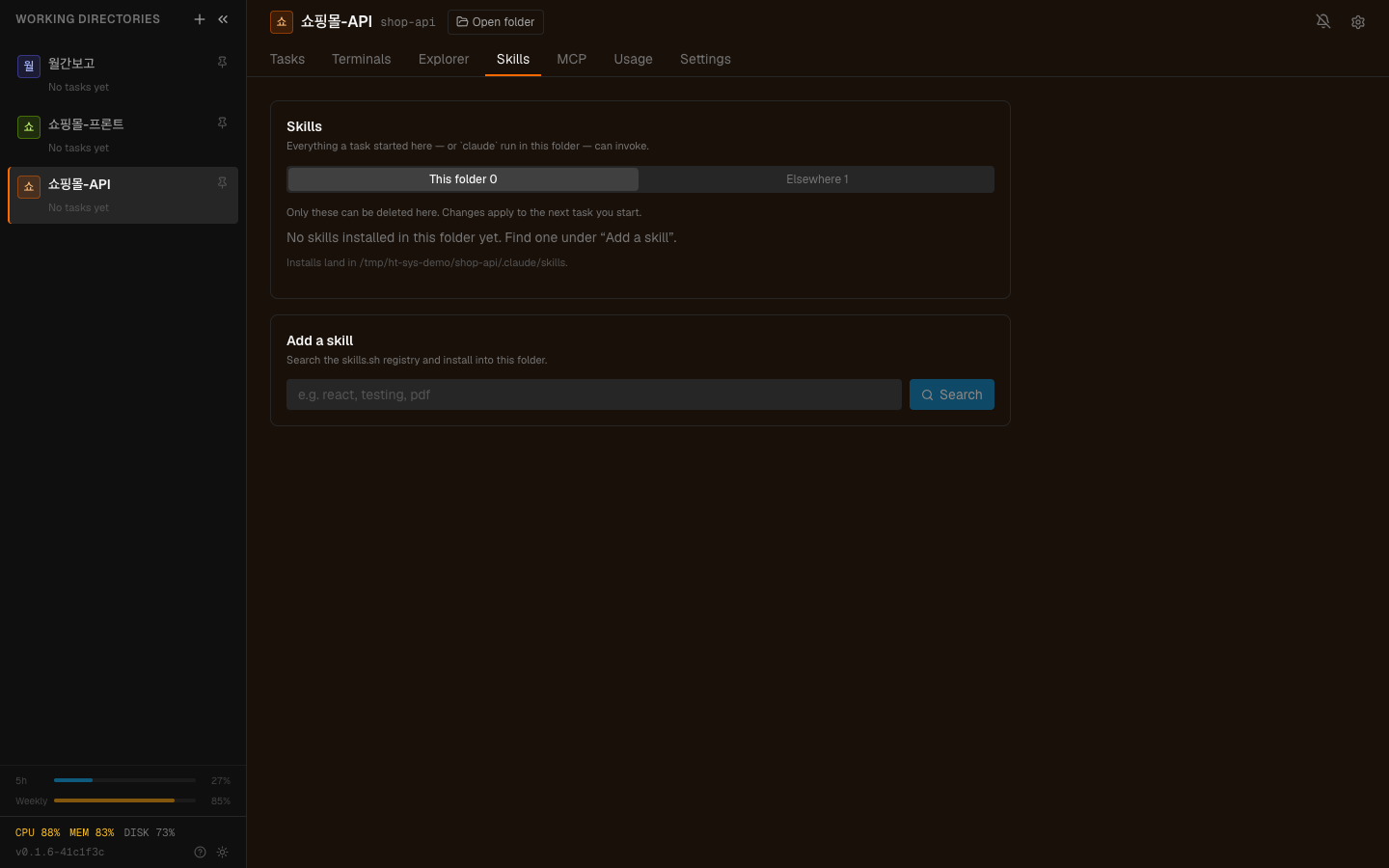
The Skills tab. It separates this folder from elsewhere and states the install path — only this folder is editable.
Skills are discovered in four places. All four are read; only one is written.
| Place | Scope | Editing |
|---|---|---|
| project | this working directory only | only this one |
| user | all your projects | read only |
| policy | installed by an administrator | read only |
| plugin | brought in by a plugin | read only |
Installing or removing from the screen touches only
<working directory>/.claude/skills. The other three belong to the machine,
the administrator, or a plugin's own updater — they are listed, not edited.
So build skills in the project place. Then they go into that folder's repository and the team uses them together.
graph TD
  A["You repeat the same work"] --> B{"Is the instruction<br/>nearly identical each time?"}
  B -->|"no"| C["Just converse"]
  B -->|"yes"| D{"Is there attached material?"}
  D -->|"no"| E["An agent or a template"]
  D -->|"yes"| F["A skill"]
  B -->|"yes"| G{"Does the team share it?"}
  G -->|"yes"| F
Three signals that a skill is right:
The third is the most skill-like case. "Deployment check" differs by project, and because the skill lives inside the working directory, each project keeps its own version.
| Situation | Instead |
|---|---|
| A one-off | just converse |
| The instruction varies a lot each time | narrow it in conversation |
| A tone or role the whole team uses | a Connect sub-agent |
| Something that calls an external system | an MCP tool |
A skill is a procedure, not a tool. If something has to be looked up or executed, that belongs on the tool side.
The principle that scope is best written as what not to do holds here too. It matters more in a skill because several people use it.
One example is more precise than ten lines of explanation.
nameA frontmatter name differing from the folder name still works. But the folder
name is the identity for anything touching the filesystem, so a mismatch
confuses deleting and moving. Keep them the same.
About once a quarter:
The third is specific to skills. When the procedure changed and the skill did not, it confidently repeats the wrong procedure.
1. What decisively separates a skill from an instruction template?
That it exists as a file inside the working directory. So it is under git and shared by the team, and the same skill is visible whether you direct from the screen or type in the terminal.
2. What must a description include?
When to use it. The model reads that line to decide whether to call the skill, so "what it does" without "when" means it never gets called.
3. Which of the four places can you edit, and why only that one?
Only project (inside the working directory). The other three — user, policy, plugin — belong to the machine, the administrator, and plugins, so they are listed but not touched.
Now turning documents into usable material → Turning documents into material
<working directory>/.claude/skills/ deploy-check/ SKILL.md report-format/ SKILL.md template.md---name: deploy-checkdescription: Runs through the pre-deployment checks in order. Use before a deploy or release.---# Deployment check## Order1. Confirm all tests pass2. Confirm the build succeeds3. Summarise the changed files4. Flag any change that is hard to undo, separately## What to look at- Are migration files included- Were environment variables added (they need applying at the target)- Were external API calls added## What not to do- Do not actually deploy. This ends at checking and reporting.✗ description: deployment check → no idea when to use it✓ description: Runs through the pre-deployment checks in order. Use before a deploy or release. → says both what it does and when to use it□ the instruction has material attached (a form, a checklist, an example)□ the team has to share it□ the content differs per project## What not to do- Do not actually deploy. This ends at checking and reporting.report-format/ SKILL.md template.md ← point at this from SKILL.md example-good.md□ is there a skill nobody has invoked□ does each description say when to use it□ has a project changed while its skill still holds the old procedure HyperTeams